


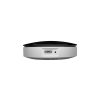
IR Smart Remote

1.674.000

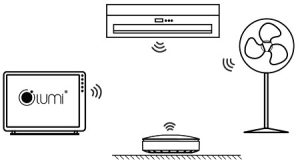
Instead of monitoring air conditioner, TV via hand-held remote control, you can simplify that with the help of Lumi infrared sensor. Even if it is turning on / off TV channel switch or increasing / decreasing the air conditioner temperature, electric fan, users can control all those things via phone with Zigbee wireless wave technology. The installation is quick and easy.
TECHNICAL INFORMATION
– Operating voltage: 100 – 20V ~ 50 – 60Hz
– Operating temperature: 0 ° C – 50 ° C
– Operating humidity: 0 – 95%
– Network: Zigbee HA 3.0, Z – wave
– Dimensions (LxWxH): 95.6 x 48.9 x 46 mm
– Weight: 66.5g
– Warranty: 24 months

Số lượng

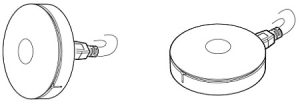
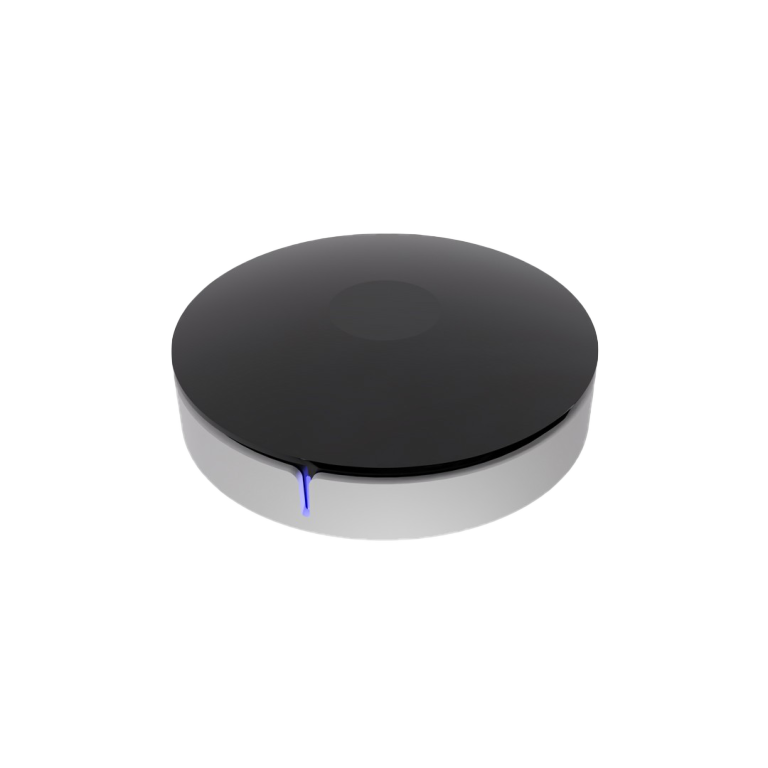
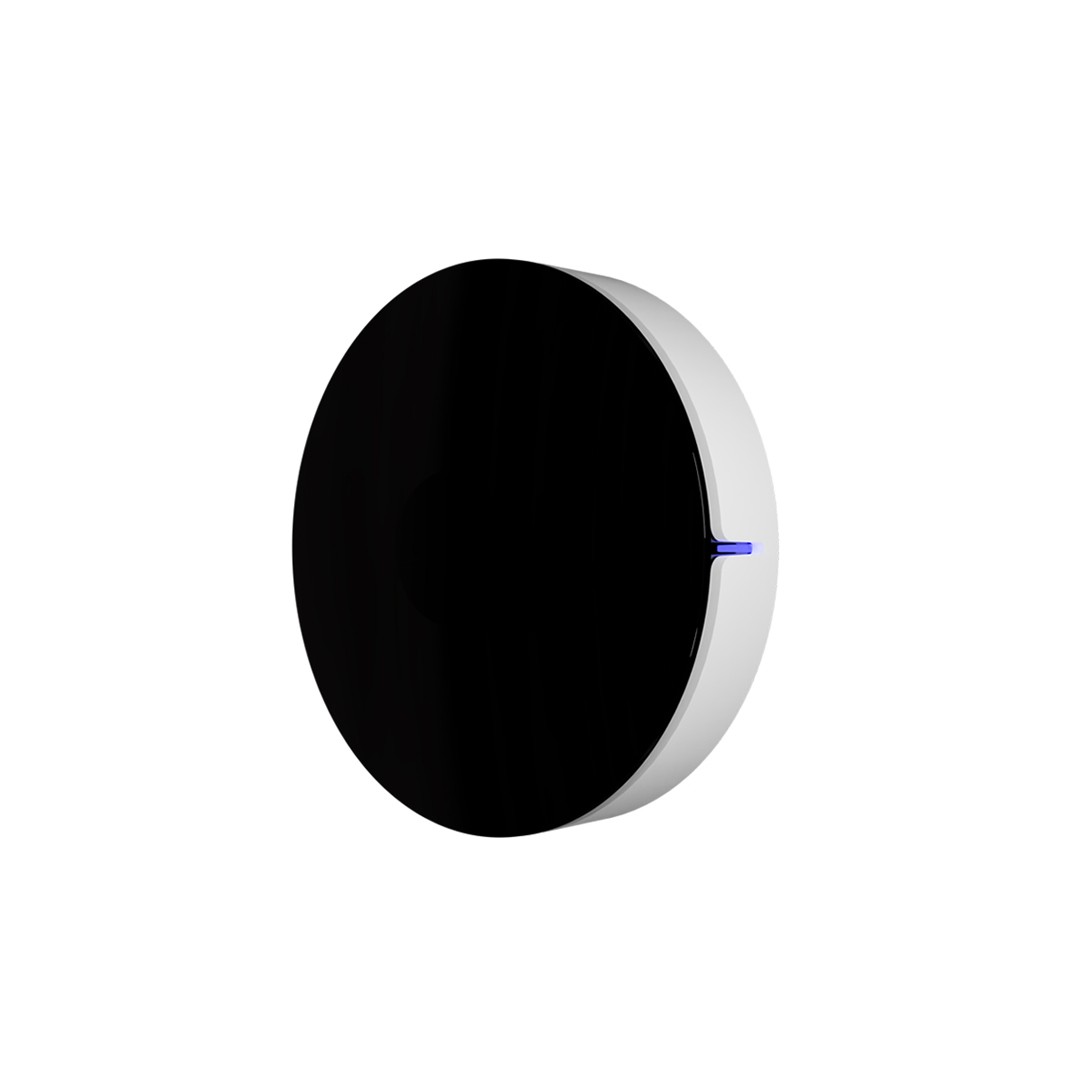
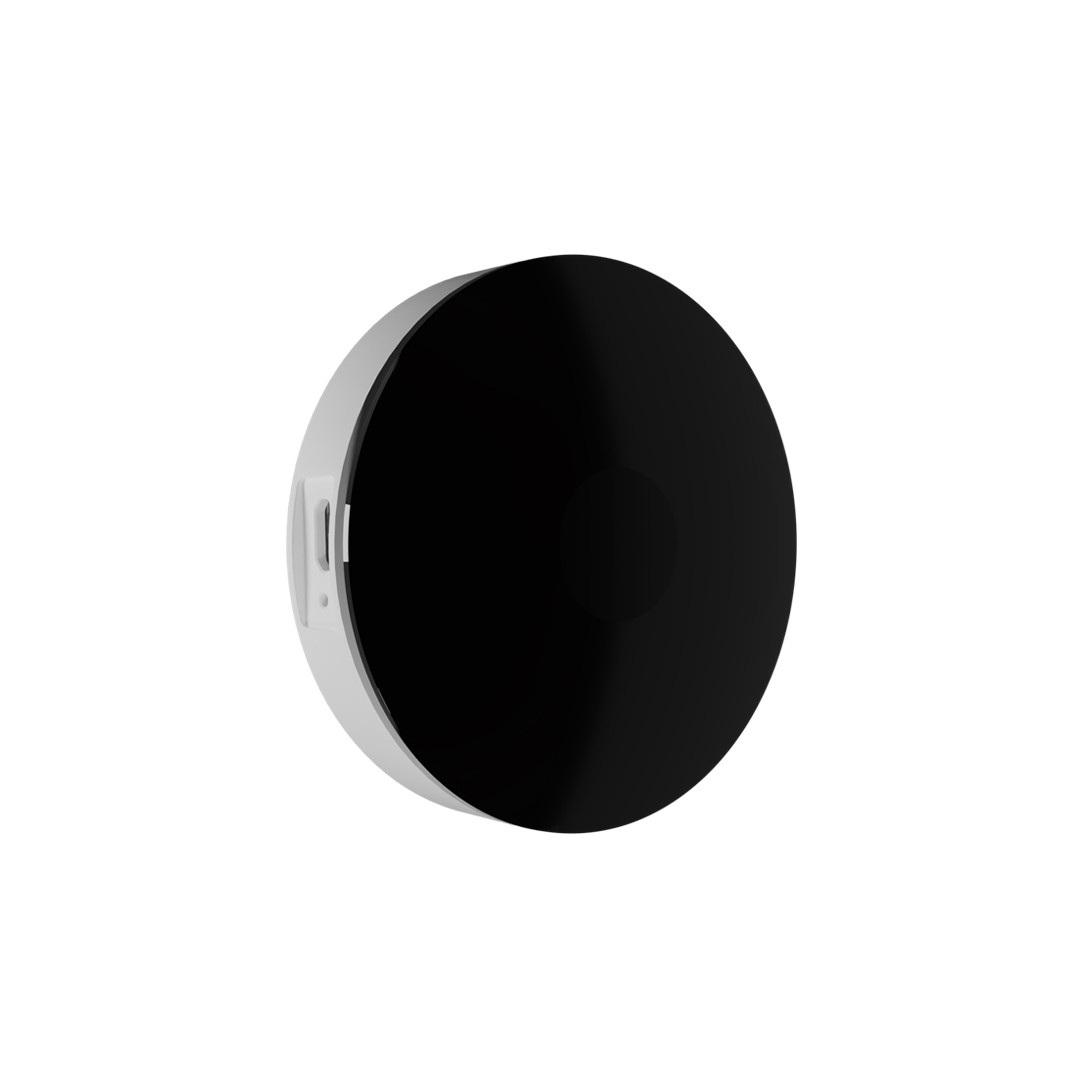
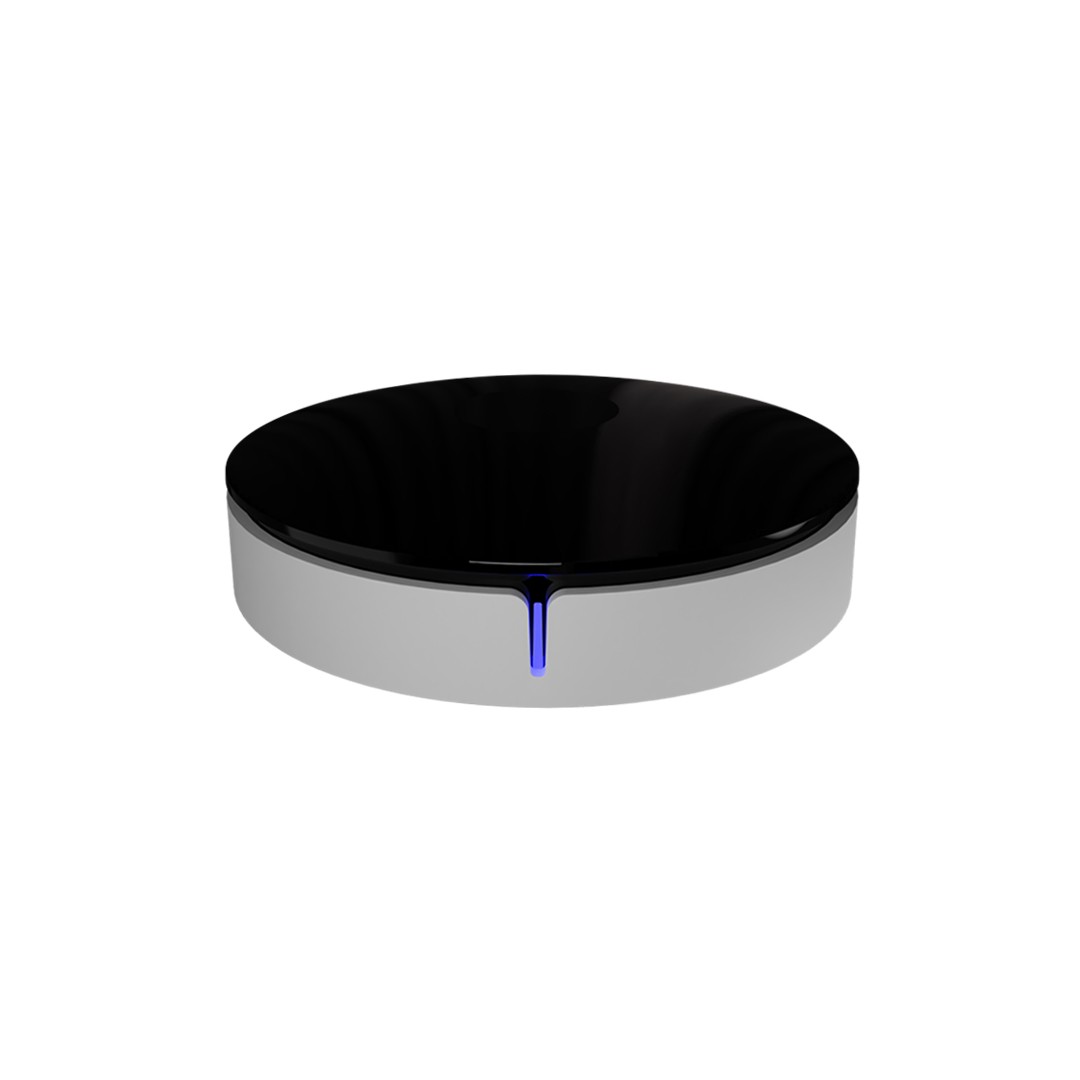
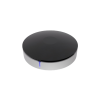
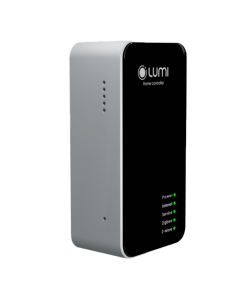
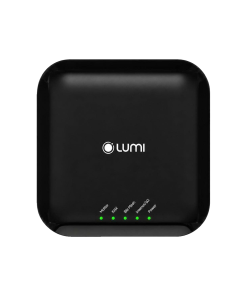
Having luxurious, eye-catching design with rounded edges and white/black color, Lumi’s infrared controller is not only the key device in air conditioner and smart TV solutio but also an important feature to make your home more impressive. Moreover, the device is made from PP non flammable plastic which is highly appreciated by international engineers and experts APPLICATION

Infrared control system has the ability to replace traditional remote controls of air conditioners, TV fans, digital players, … and receive and learn from over 1,000 commands. The device contains libraries of more than 300 codes available for 4 control categories: TV, Fan, air conditioner and digital player.
Thanks to the combination with the central control unit, you can schedule on / off smart air conditioning to turn on the air conditioner at 10 pm and turn off at 4 am, etc. Additionally, the intelligent infrared controller also has integrated sensors for measuring environmental parameters to increase or decrease the temperature based on the external environment.

With an infrared control device, it is possible to create multiple interfaces on the phone to control multiple devices at the same time. For example, appliances in the living room can be set up to create a console from what is available in the library. In case the library does not support it, it is also possible to set the “learning” mode for the device.

Note: Place the infrared control device within 5m away from the device controlled.
With the cooperation between Google Assistant voice control and Lumi solution, now you just need to say “OK Google, turn on the air conditioner” or “OK Google, turn on the TV”, immediately the TV and air conditioner will be activated as you want.

Moreover, the 2019 infrared controller is much more improved with the library function, which enables you to control the device via your phone similar to a remote control.

OPERATION

The infrared controller will take control commands from the library or learn all the commands from remote controls of all devices in your house. On the user’s phone app will appear icons such as: air conditioner, TV, fan so instead of using Remote, users will directly press icons on their phone to control the device.
Each device will have a different interface.

Outstanding advantages of the infrared controller

Instead of 10 remote controls, you only need one phone to completely control the devices in the house.
On the other hand, when users install the context of “going home” – a system of devices including air conditioner, water heater, lights, curtains and so on will be ready to serve you as soon as you arrive home.

INSTALLATION

The way to install Lumi infrared controller is very simple, you can install it yourself at home:
✔ Plug the 5VDC adapter (included in the product box) into the 220V power source
Overall

  • Product code: LM-IR2.0
  • Lumi IR smart remote is a device that allows users to control home appliances such as TVs, fans, air conditioners through the Lumi Life+ instead of using the original remote controls.

Technical specifications

Power supply 5V DC/ 1A
Operating temperature 0℃ – 50℃
Communication Zigbee
Zigbee transmit power 10 dbm
Dimensions (Φ x C) 70 x 21 mm
Weight 66.5 gram

Installation

Step 1: Power on the device

  • Use the included power adapter to power on the device
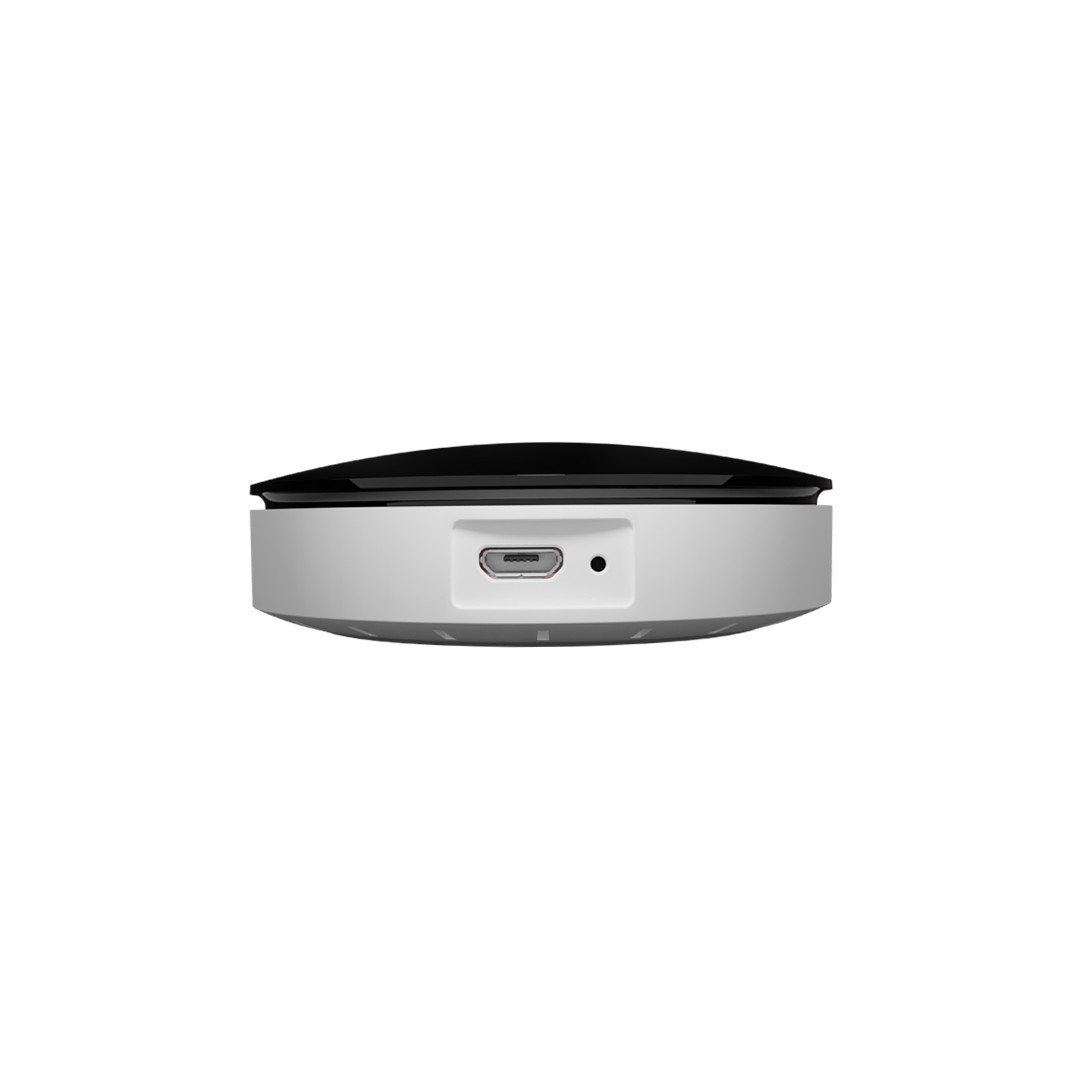
  • The device has two power locations: the bottom or side of the device
  • After being powered on, the indicator light on the device will flash red three times and then turn red


Power on the device
Power on the device

Step 2: Install the device
The LM-IRZ device is designed with two options:

  • Place on a table or flat surface near the infrared receiver and the devices you want to control.
Install Lumi IR Smart Remote on a flat surface
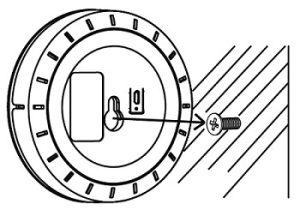
  • Mount the LM-IRZ 2.0 device on a wall by tightening the expansion screws that came with it and then mounting it such that the screw hole on the back of the device fits into the head of the expansion screw.
Install Lumi IR Smart Remote on the wall

Note: The distance from the remote control to the devices must be less than 5 meters.

Setting up device on the Lumi Life+ app

Joining the network

  • To set up the IR remote control using the app on your phone, you need to have a HC central controller and have created a home on the system.
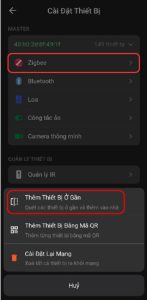
  • Log in to the Lumi Life+ app => select Settings => select Device settings => select HC => Zigbee => allow the device to join the network.
  • Observe the indicator light on the device. If the device joins the network successfully, the indicator light will flash red three times in a cycle of once per second.
  • If the device does not join the network, the switch may have been configured. In this case, you need to reset the device to return to the network joining mode.
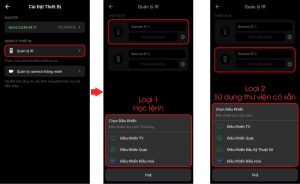
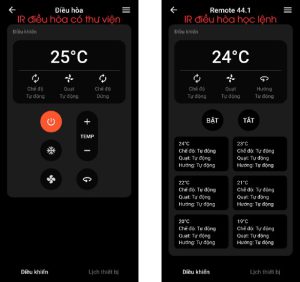
  • When the device joins the network successfully, the IR 2.0 remote will display two types of controls as shown below:
Device joins the network successfully
  • Type 1: Learning commands from a handheld remote control to control the device.
  • Type 2: Controlling using library commands available on the Lumi server.

Setting up the type of control using the library

Step 1:

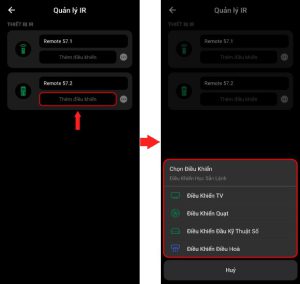
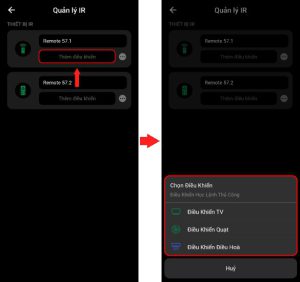
  • The user selects the available library control => Select “Add remote” to add the control you want to use.
Create a remote using the library

Step 2:

  • The user selects the type of control they want to use.
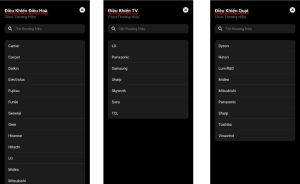
  • For available command controls, Lumi supports 4 types: TV, Fan, AC, and Set top box.
Select the type of device

Step 3:

  • Select the brand of the device you selected in step 2.
Select the brand of the device

Step 4:

  • Try to control the device using the commands displayed on the screen to check if the device can be controlled.

Test controlling the device

  • If the device can be controlled, the user selects “Yes”, proceeds to name the control and puts the control into room installation the IR.
  • If the signal is not received, press “No” to continue trying a different type.

Setting up the type of control that learns commands from a handheld remote

Step 1: Create a Learning Remote (Type 1)

  • The user selects the Learning Remote type.
  • For the Learning Remote type, it supports 3 types of devices: TV, Air Conditioner, and Fan.
Create a learning remote

Step 2: Put the device into learning mode

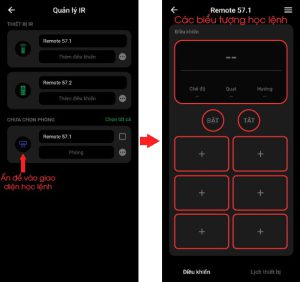
  • The newly created remote will be displayed in the IR tab.
  • Tap the icon of the newly created remote, then proceed to learn the command.
Remote without learning commands
Remote learning commands

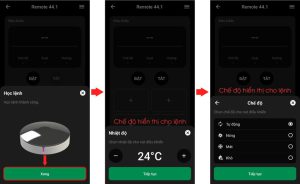
Step 3: Learn commands from the remote’s buttons

  • By default, all icons are hidden or do not have control command information. The user presses the command icons on the remote to proceed with learning the command.
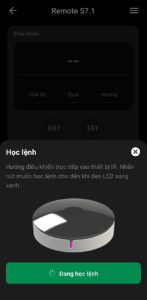
  • Select “Learn Command” on the screen to display the learning command status.
  • The user points the device’s remote control towards the IR remote and presses the command button to be learned.
  • During the learning process, the user can press “Cancel” to cancel the IR learning status.
  • After learning the command, the icon that has just been learned will light up, allowing customers to tap to control the device.
Remote after learning commands

Step 4: Name the remote and put the remote into the room

  • Activating infrared commands from the Lumi Life app
  • To control the device, the user taps directly on the corresponding command icon on the app. At this time, the indicator light on the IR remote will flash green twice to indicate that the control command has been sent successfully.
Using the remote on the app

Note:

  • For the type of remote that needs to learn commands, the button on the App must be learned first before the device can be activated.
  • When controlling the device, the remote icon will not change the status on the app.

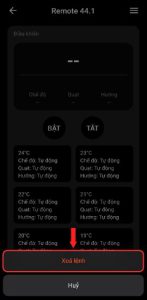
Deleting learned commands

  • Only applies to the learning remote type.
  • The user holds down the command icon of the command to be deleted => selects “Delete” to proceed with deleting the command or selects “Cancel” to cancel the selection, then returns to the control screen.
Deleting commands on the remote

In addition, the user can set up the device with advanced features such as:

  • Setting rules
  • Setting scenes
  • Setting schedules

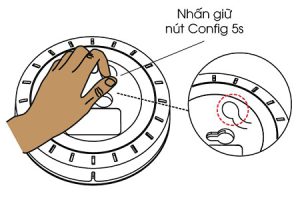
Reset the device

The user holds down the Config button for 5 seconds (round plastic button on the bottom) until the indicator light turns red, then releases the button. The device will leave the network and reset. The device will reset successfully and return to its original state.

Reset the device
Reset the device

Packaged product

The product packaging box includes: 1 IR remote control, 1 user manual, 1 5V/1A adapter, and 1 set of mounting screws.

Tìm điểm bán

CÔNG TY TNHH ĐỨC HÒA IOT

32B Nơ Trang Long- Thị Trấn Kiến Đức- Huyện Đăk r Lấp- Tỉnh Đăk Nông

CÔNG TY TNHH ĐIỆN THÔNG MINH TÂM PHÁT

49/4 Đường ĐT743, tổ 4 khu Phố Trung Thắng, Phường Bình Thắng, Thành phố Dĩ An, Tỉnh Bình Dương

CÔNG TY TNHH THƯƠNG MẠI VÀ DỊCH VỤ AN TÂM LOCK

Shophouse 4B Chung cư An Phú Thịnh – Quy Nhơn – Bình Định

SMARTHOME THĂNG LONG

32 Lê Duẩn, Hà Tĩnh

Công Ty TNHH Kinh Doanh Và Lắp Đặt Công Nghệ TP

Số 101, đường Hải Thượng Lãn Ông, Tổ 6, Phường Thành Sen, Tỉnh Hà Tĩnh

SMARTHOME HÒA BÌNH

Số 299 Trần Hưng Đạo, phường Phương Lâm, thành phố Hòa Bình, tỉnh Hòa Bình

CÔNG TY TNHH CÔNG NGHỆ ANH PHÚ VINH

Đường Chợ Cơm, Phạm Kham, Lạc Hồng, Văn Âm, Hưng Yên

CÔNG TY TNHH NHÀ THÔNG MINH HOMEQ

128 Song Hành, KDC Lake View, Phường An Phú, Quận 2, TP Thủ Đức, TP.HCM

CÔNG TY TNHH MINH TRÚC HOME

Số 99, Đường số 5, P. An Phú, TP. Thủ Đức, TP. HCM

SHOWROOM 6SHOME

86 Đường số 9, KĐT Vạn Phúc, Phường Hiệp Bình Phước, TP. Thủ Đức, TP. Hồ Chí Minh

CÔNG TY TNHH KỸ THUẬT CÔNG NGHỆ MINH ĐẠT

số 24, Đường số 7, KDC Cityland Park Hills, phường 10, Quận Gò Vấp

CÔNG TY TNHH CÔNG NGHỆ AVASMART

253 Tân Sơn Nhì, P. Tân Sơn Nhì, Quận Tân Phú, TP. HCM

CÔNG TY TNHH CUỘC SỐNG SỐ

Số 333 Hồ Sen - Quận Lê Chân - TP Hải Phòng

SHOWROOM NHÀ THÔNG MINH MINH HIẾU

465, khu biệt thự WaterFront, Lê Chân, Hải Phòng

CÔNG TY TNHH SMARTHOME THÁI NGUYÊN - CHI NHÁNH BẮC KẠN

92 Cách Mạng Tháng 8, Trưng Vương, Thành phố Thái Nguyên, Thái Nguyên, Việt Nam

CÔNG TY TNHH CÔNG NGHỆ 4TU

14/1, Trần Hưng Đạo, Khóm Mỹ Thọ, Phường Long Xuyên, An Giang

NHÀ THÔNG MINH LUMI CAO BẰNG

Số 17, tổ 5, phường Sông Hiến, TP. Cao Bằng

CÔNG TY TNHH DỊCH VỤ THÔNG TIN VÀ GIẢI PHÁP CÔNG NGHỆ TDL

L2-55, Đường Số 7, Khu TTVH Tây Đô, KV3, P. Hưng Thạnh, Q, Cái Răng, Cần Thơ

CT TNHH CÔNG NGHỆ PHÚ VINH IoT

71, Nguyễn Trãi,P7, TP Mỹ Tho,Tiền Giang

CÔNG TY GIẢI PHÁP CÔNG NGHỆ HKTECH

Lô 6 Căn 1, Đường Phan Thị Ràng, Phương Rạch Giá, Tỉnh An Giang

CÔNG TY TNHH TƯ VẤN THƯƠNG MẠI NHÀ THÔNG MINH

A63, P. Phú Thủy, TP. Phan Thiết, tỉnh Bình Thuận

SHOWROOM IOT MINH HOÀNG

Số 63 Hùng Vương 3, P. Hoàng Văn Thụ, Thành Phố Bắc Giang

CÔNG TY TNHH ĐIỆN NƯỚC ĐỒNG PHÁT

42/19 Ngô Văn Lớn, Phường 4, Tân An, Long An

CÔNG TY TNHH GIẢI PHÁP CÔNG NGHỆ HUY PHÁT

105 đường Tôn Đức Thắng, phường 5, TP. Cà Mau, Cà Mau

Công ty TNHH CVT HOLDING

110 Huyền Trân Công Chúa, Phường Tam Thắng, Thành Phố Hồ Chí Minh

CÔNG TY TNHH XÂY DỰNG VÀ THƯƠNG MẠI CAO PHONG

Công ty TNHH Xây dựng Số 321 Mê Linh, P. Liên Bảo, TP. Vĩnh Yên, Vĩnh Phúc

NHÀ MÁY LUMI SMART FACTORY

Lô 12, KCN Thăng Long 3, Thiện Kế, Bình Xuyên, Vĩnh Phúc

SHOWROOM CÔNG TY TNHH NHÀ AN NHIÊN

207 Nguyễn Văn Linh - Hòa Thành - Tây Ninh

CÔNG TY TNHH CÔNG NGHỆ PHÚ VINH IOT

71A Nguyễn Trãi, Phường 7, TP. Mỹ Tho, Tiền Giang

CÔNG TY TNHH TM VÀ DỊCH VỤ NHÀ THÔNG MINH THÁI BÌNH

Tổ 6, đường Võ Nguyên Giáp, P.Hoàng Diệu, Tp.Thái Bình, Thái Bình

CÔNG TY TNHH ĐẦU TƯ SAO ĐĂNG - STAHOMES

Số 101 Doãn Khuê, P. Phú Khánh, TP Thái Bình

CÔNG TY TNHH SMART HOME THÁI NGUYÊN

136B Phan Đình Phùng, phường Phan Đình Phùng, Thành phố Thái Nguyên

CÔNG TY TNHH XD VIỆT HÙNG 68

165 Dương Đình Nghệ, Tp Thanh Hóa

CÔNG TY TNHH CÔNG NGHỆ KỶ NGUYÊN MỚI

82 Phan Đình Phùng - Khu Bình Minh - TP.Thanh Hóa

Showroom Lumi Đức Tiệp CS1

Số 300 Quang Trung, TP. Tuyên Quang, Tuyên Quang

Showroom Lumi Đức Tiệp CS2

242 Phạm Văn Đồng, P. Hưng Thành, TP. Tuyên Quang, Tuyên Quang

CÔNG TY TNHH THÁI THIÊN DI

30 Dã Tượng, Phường 6, TP. Sóc Trăng, Tỉnh Sóc Trăng

CÔNG TY TNHH PHÚ HƯNG IOT

287 Lý Thường Kiệt, TP Đồng Hới, Tỉnh Quảng Bình

CÔNG TY CỔ PHẦN CÔNG NGHỆ THÔNG MINH PHC

259 Lê Lợi, Phường Chánh Lộ, Thành phố Quảng Ngãi, Tỉnh Quảng Ngãi

CÔNG TY TNHH MT SMARTHOME

180 Trưng Nữ Vương, P. Tân Thạnh, TP. Tam Kỳ, Tỉnh Quảng Nam

CÔNG TY TNHH NHÀ THÔNG MINH VIỆT DUY

Ngã Tư 617, Xã Tam Hiệp, Huyện Núi Thành, Tỉnh Quảng Nam

CÔNG TY CỔ PHẦN AMY HẠ LONG

219 ngõ 3 Cao Thắng, TP Hạ Long

NPP CUỘC SỐNG SỐ - CHI NHÁNH QUẢNG NINH

647 Nguyễn Văn Cừ, phường Hồng Hà, thành phố Hạ Long, tỉnh Quảng Ninh

CÔNG TY TNHH TM & XD NAM ANH PHÚ THỌ

Số 16 Tân Xuân, Phường Việt Trì, Tỉnh Phú Thọ

CÔNG TY TNHH LUMI VIETSUN

27 Quốc lộ 27 cũ, Phan Rang Tháp Chàm, Ninh Thuận

CÔNG TY CỔ PHẦN CÔNG NGHỆ VINH SMART

61 Đinh Công Tráng, Lê Mao, TP. Vinh, Nghệ An

CÔNG TY TNHH ĐẦU TƯ SAO ĐĂNG - STAHOMES

Số 101 Doãn Khuê, P. Phú Khánh, TP Thái Bình

SHOWROOM NHÀ THÔNG MINH THIÊN ÂN

Số 478, đường Trần Hưng Đạo, thành phố Ninh Bình, tỉnh Ninh Bình

Showroom nhà thông minh Lumi Thiên Ân, Ninh Bình

Số 332 Phố Thống Nhất, Thị trấn Me, Gia viễn, Ninh Bình

CÔNG TY TNHH CÔNG NGHỆ ĐIỆN THÔNG MINH HOÀNG PHÁT

Số 69 Hoàng Văn Thụ, Phường 1, TP. Bảo Lộc, Lâm Đồng

CÔNG TY TNHH MTV VIỆT NGỌC LAI CHÂU

16/8 Đường 19/8 tổ 1 phường Đoàn Kết, TP. Lai Châu

CÔNG TY TNHH MTV NAM PHÁT

Số 266 Đường Nguyễn Huệ, phường Phố Mới, Tp. Lào Cai

CÔNG TY ĐIỆN THÔNG MINH LẠNG SƠN

169 Bà Triệu, Hoàng Văn Thụ, Lạng Sơn

NHÀ PHÂN PHỐI ĐBSCL - MEKONG2

207 Lâm Quang Ky, Phường Vĩnh Bảo, TP. Rạch Giá, Kiên Giang

CÔNG TY TNHH TM DV ĐỒNG TIẾN

STH 41.04 đường số 8 Hà Quang 2 - Phước Hải - TP. Nha Trang - Khánh Hòa

CÔNG TY TNHH CÔNG NGHỆ APPTECH

Lô 5 đường A2, Khu đô thị VCN Phước Long 2, Phương Nam Nha Trang, Khánh Hòa

CÔNG TY TNHH CÔNG NGHỆ ÂU LẠC

27A Hoàng Hoa Thám, phường Tây Sơn, thành phố Pleiku, Gia Lai

SMARTHOME MINH PHONG

441A Nguyễn Văn Cừ, Tân Lập, Thành phố Buôn Ma Thuột, Đắk Lắk, Việt Nam

CÔNG TY TNHH 247 ĐỒNG THÁP

Số 122, đường 30/4, Phường 1, Thành phố Cao Lãnh, Tỉnh Đồng Tháp

CÔNG TY TNHH THIẾT BỊ CÔNG NGHỆ THIÊN PHÚC QUÝ

89 Lê Duẩn, Tổ 7 Khu 12, Long Thành, Đồng Nai

CÔNG TY TNHH MTV HOÀNG NHẬT VÂN

1124/4 Hẻm 3 đường Đồng Khởi, tổ 22, kp3, P Trảng Dài,Tp Biên Hòa, Đồng Nai.

CÔNG TY TNHH MỘT THÀNH VIÊN 836

Số 10 Hùng Vương, Tân Bình, TP Đồng Xoài, Bình Phước

CÔNG TY TNHH DV CÔNG NGHỆ MLV SMART

70 Võ Văn Tần , Tân Bình , Đồng Xoài, Bình Phước

CÔNG TY CỔ PHẦN TƯ VẤN XÂY DỰNG VÀ THIẾT BỊ NHÀ KINH BẮC

Số 60A - 135 Lê Quang Đạo - Đông ngàn - Từ Sơn - Bắc Ninh

CÔNG TY TNHH GIẢI PHÁP THIẾT BỊ AN NINH THỊNH PHÁT

K69/10 Phạm Thị Liên, Phường Kim Long, TP Huế

CÔNG TY TNHH MTV THƯƠNG MẠI ĐIỆN QUANG

237-239 Phan Đăng Lưu, P. Phú Hòa, TP Huế, Thừa Thiên Huế

CÔNG TY TNHH MTV THƯƠNG MẠI ĐIỆN QUANG

85 Trường Chinh, P. Xuân Phú, TP. Huế

CÔNG TY CÔNG NGHỆ VÀ TRUYỀN THÔNG T&C

160 Trần Phú, Minh Khai, Hà Giang

CÔNG TY TNHH CÔNG NGHỆ SONG PHÚC

Số 54, ngõ 5, đường Nguyễn Thái Học, P. Liêm Chính, TP. Phủ Lý, tỉnh Hà Nam

SHOWROOM GIA HÂN SMART

6 Lê Duy Đình, Chính Gián, Thanh Khê, Đà Nẵng

CÔNG TY CỔ PHẦN CÔNG NGHỆ TENKI

26 Bàu Tràm 1 - Khuê Trung - Cẩm Lệ - Đà Nẵng

CHI NHÁNH LUMI TẠI ĐÀ NẴNG

Số 514 Đường 2/9, Q. Hải Châu, Đà Nẵng

CÔNG TY TNHH CÔNG NGHỆ VÀ THƯƠNG MẠI MINH NGUYÊN

456 Dũng Sĩ Thanh Khê, Phường Thanh Khê, Đà Nẵng

CÔNG TY TNHH HOÀNG MINH GROUP

01 Lê Tấn Toán, P. An Hải Bắc, Q. Sơn Trà, TP. Đà Nẵng

CÔNG TY TNHH GIẢI PHÁ[ NHÀ THÔNG MINH HÀ NỘI

No.02, LK 31, KDV 16 17 18, Khu đô thị Dương Nội, Hà Đông, Hà Nội

TRỤ SỞ CHÍNH LUMI VIỆT NAM

38 Đỗ Đức Dục, Nam Từ Liêm

CTY TNHH SMARTGROUP

D03 - L14 Khu đô thị mới Dương Nội, Hà Đông

CÔNG TY TNHH CÔNG NGHỆ XANH THÔNG MINH VIỆT NAM

Số 30, ngõ 210 Hoàng Quốc Việt, Bắc Từ Liêm, Hà Nội

CÔNG TY TNHH OMAQUA VIỆT NAM

Xóm 4, Xã Ninh Hiệp, Huyện Gia Lâm, Thành phố Hà Nội, Việt Nam

lumi cung cấp

Cùng giải pháp

Hotline Hotline Zalo Zalo Messenger Messenger Tư vấn nhà thông minh Tư vấn nhà thông minh